
What problem does an MCP Gateway solve?
An MCP Gateway solves the coordination problem that appears when multiple AI applications need safe, consistent access to multiple MCP Servers. The Model Context Protocol uses a client-host-server model, where host applications initiate connections, clients maintain sessions, and servers expose capabilities such as tools, resources, and prompts over a standard protocol. (modelcontextprotocol.io)
That architecture is powerful, but direct connections can become difficult to manage. Each client may need separate configuration, credentials, network access, approval rules, and logging. As the number of servers grows, the operational burden grows with it.
The gateway pattern places a managed layer in the middle. Clients connect to the gateway, and the gateway connects to approved MCP Servers. This gives teams one place to shape access, route requests, enforce security controls, and monitor how tools are being used.
In practical terms, the gateway helps answer questions like:
- Which tools should this AI client be allowed to discover?
- Which MCP Server should receive a specific tool call?
- Should a tool execution require approval, authentication, or a scoped secret?
- What happened during a tool call, and where should logs or traces be reviewed?
- How can servers be added, removed, or isolated without rewriting every client configuration?
A simple local setup may not need that layer at first. But once MCP moves from experimentation into shared team usage, the gateway becomes a cleaner way to scale.
The basic architecture of an MCP Gateway
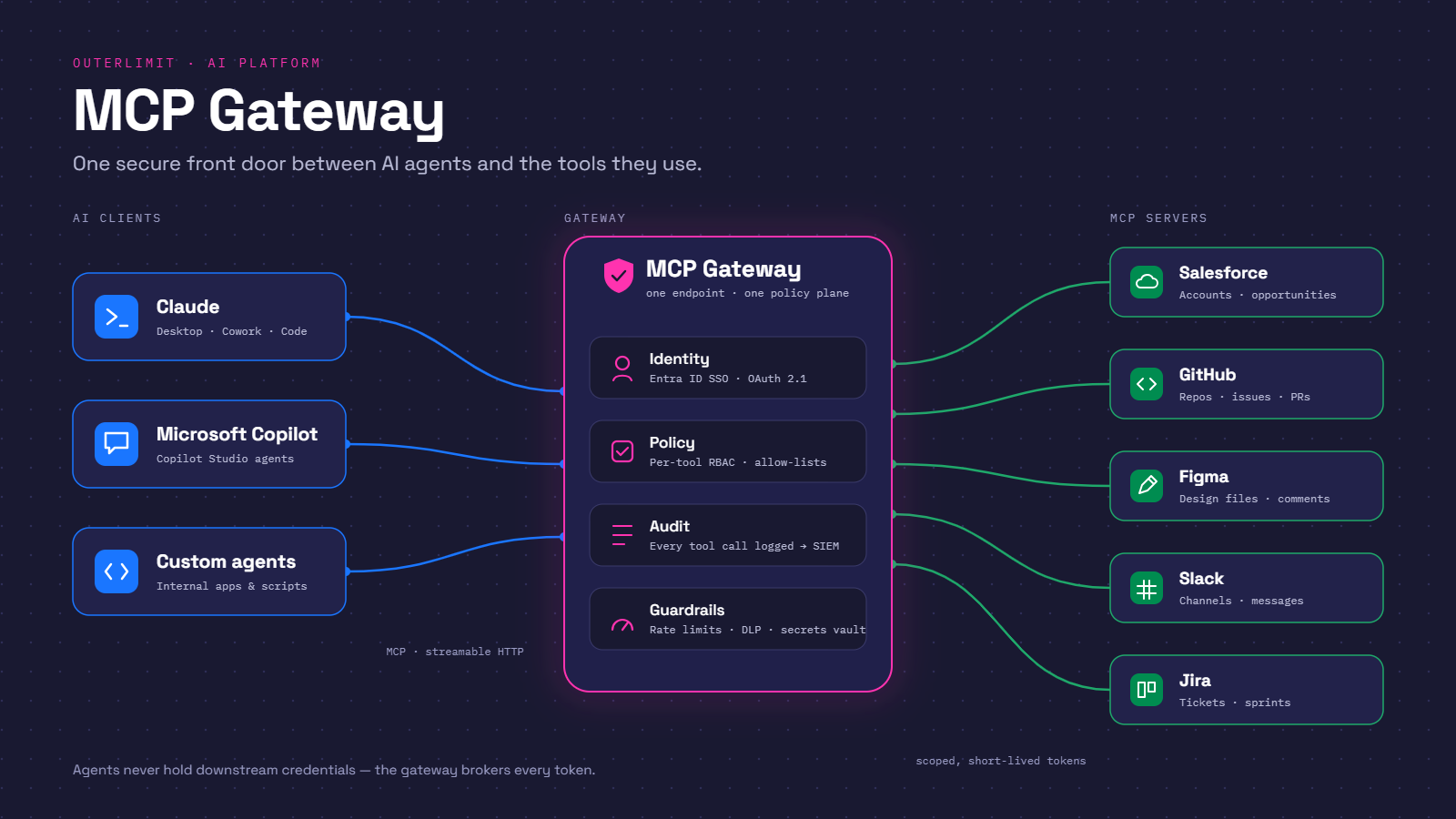
At a high level, the architecture has four major parts: the AI host or client, the gateway, the MCP Servers, and the supporting control plane around secrets, policies, logs, and deployment. The exact implementation can vary, but the pattern is consistent: the gateway receives requests from clients, applies rules, and forwards approved messages to the right backend server.
The host is the AI-facing application. It could be an IDE, desktop assistant, internal agent platform, workflow tool, or another application that needs model-accessible tools. The MCP client component inside that host communicates using the protocol and expects a list of available capabilities.
The MCP Gateway acts as an aggregation and enforcement layer. It may expose a single endpoint to clients while maintaining connections to many backend servers. It can normalize configuration, decide which tools are visible, and broker communication between clients and servers.
MCP Servers are the specialized components that actually expose capabilities. One server may provide repository operations, another may expose database queries, another may interact with project management systems, and another may wrap an internal API. The gateway does not replace these servers; it coordinates access to them.
The supporting layer is what makes the architecture production-friendly. It may include identity providers, secret stores, policy files, approval workflows, audit logs, container runtimes, network rules, tool management and observability tools. Without this layer, a gateway is merely a router. With it, the gateway becomes a governed access point.
Core responsibilities inside the gateway layer
A well-designed gateway does more than pass messages along. It gives engineering, security, and platform teams a single place to manage how MCP capabilities are discovered, selected, invoked, and observed.
Capability discovery and presentation
MCP clients need to know which tools, prompts, and resources are available. The gateway can collect those capabilities from multiple MCP Servers and present a curated view to each client.
This matters because not every client should see every tool. A code assistant may need repository and build tools, while a support assistant may need ticket and knowledge base tools. A gateway can reduce noise by presenting only the tools that are relevant and allowed.
Good discovery design also improves model behavior. When the available tool list is focused, the model has fewer irrelevant options to consider. That can make tool selection clearer and reduce accidental calls to inappropriate capabilities. This increases agent productivity and mitigates un-necessary cost.
Request routing
Once a client chooses a tool, the gateway determines where the request should go. It maps the tool name or namespace to the correct backend MCP Server and forwards the call in a way that preserves the expected protocol behavior.
Routing may be simple in small systems: one tool belongs to one server. In larger systems, routing may consider server health, environment, tenant, workspace, version, or policy. The gateway can also hide backend changes from clients. If a tool moves from one server to another, the client configuration does not necessarily need to change.
This abstraction is one of the main reasons teams adopt a gateway architecture. It separates client experience from backend server topology.
Policy enforcement
The gateway is the natural place to enforce access rules because it sits directly in the path of tool discovery and execution. Instead of spreading policy checks across every client and every server, teams can centralize many of those decisions.
Policies may define which users, groups, clients, environments, or workloads can access specific tools. They may also define when approval is needed, whether a tool can run in read-only mode, which secrets are available, or whether a request must be blocked entirely.
This does not mean backend servers should stop validating requests. Defense in depth still matters. But the gateway can provide a consistent first layer of governance before a request reaches a tool that may touch sensitive systems.
Secrets and configuration management
Many MCP Servers need credentials to connect to external services. A gateway-oriented architecture can help prevent those credentials from being scattered across client machines or agent configuration files.
For example, Docker’s MCP tooling describes secrets management and a gateway that can run MCP servers in isolated containers, limiting privileges, network access, and resource usage. (docs.docker.com)
The broader principle is straightforward: clients should not need broad access to raw credentials just to request a tool call. The gateway and server runtime should provide scoped, controlled access only where needed.
Observability and auditability
AI tool use is difficult to govern without visibility. The gateway can log what tools were exposed, what calls were attempted, what policies were applied, which server handled the request, and whether execution succeeded or failed.
Those records help teams debug broken integrations, investigate unexpected behavior, and understand adoption patterns. They are also useful for security reviews, especially when tools can retrieve data, modify systems, create tickets, or trigger workflows.
The most useful gateway logs are not just raw request dumps. They should be structured enough to answer operational questions while still protecting sensitive data. In many environments, logging full prompts, secrets, or tool outputs may create its own risk.
How does an MCP Gateway enforce security?
An MCP Gateway enforces security by controlling which tools are visible, which tool calls are allowed, and how execution flows from the client to the MCP Server. It manages tool access before execution begins, then manages execution flow by routing approved calls to the correct server under the applicable policy, identity, network, and runtime constraints.
This is especially important because MCP tools can be powerful. A tool might read files, query a database, open a pull request, create a customer record, or call an internal API. If access is too broad, an AI client may be able to invoke capabilities that the user, workspace, or workflow should not use.
The gateway can enforce security at several points.
First, it can filter discovery. If a client is not allowed to use a tool, the gateway can avoid presenting that tool at all. This reduces accidental exposure, wasteful token use and limits the model’s available action space.
Second, it can authorize execution. Even if a tool is visible, a specific call may require additional checks. The gateway can evaluate the user, client, requested operation, parameters, environment, and policy before forwarding the request.
Third, it can manage execution flow. The gateway can decide whether a request should be forwarded, blocked, redirected, queued, or paused for approval. It can also ensure that calls reach the intended MCP Server rather than an untrusted or misconfigured endpoint.
Fourth, it can limit blast radius. When paired with container isolation, scoped credentials, network restrictions, and resource limits, the gateway can help prevent one compromised or over-permissioned server from becoming an unrestricted path into the broader environment.
Security enforcement often includes practical controls such as:
- Tool allowlists and denylists that define exactly which tools a client may access.
- Role- or group-based policies that align tool access with user permissions.
- Read/write separation so informational tools are easier to approve than tools that modify systems.
- Human approval gates for destructive, expensive, or sensitive operations.
- Scoped secret injection so servers receive only the credentials they need.
- Runtime isolation through containers, sandboxing, or restricted network paths.
- Audit logs that capture tool calls, decisions, and outcomes without leaking unnecessary sensitive content.
The MCP specification includes authorization concepts at the transport level, and its security guidance emphasizes careful token handling, including audience validation and avoiding unsafe token pass through. (github.com) A gateway can help operationalize those ideas, but it should be implemented as part of a broader security model rather than treated as the only control.
The lifecycle of a tool call
Understanding the gateway is easier when you follow a single tool call from discovery to result.
A typical flow looks like this:
- The client connects to the gateway. The AI host uses its MCP client configuration to establish a session with the gateway endpoint.
- The gateway identifies context. It may determine the client, user, workspace, profile, environment, or other policy-relevant information.
- The gateway builds the visible capability set. It queries or loads available tools from configured MCP Servers, then filters them according to policy.
- The model selects a tool. Based on the user’s task and the available tool descriptions, the AI host decides to request a tool call.
- The gateway evaluates the request. It checks whether the tool is allowed, whether the arguments are acceptable, whether approval is required, and which backend server should handle it.
- The gateway forwards the call. If approved, the request is routed to the correct MCP Server.
- The server executes the operation. The MCP Server interacts with its underlying system, such as a filesystem, API, database, or SaaS application.
- The result returns through the gateway. The gateway may log the outcome, apply response handling rules, and return the result to the client.
- The host continues the conversation. The model uses the tool result to answer the user or decide whether another action is needed.
This flow shows why the gateway is not just a network convenience. It participates in the decision path. It helps determine what the model can see, what it can call, and how the call reaches execution.
MCP proxy server vs MCP gateway: what is the difference?
The difference between an MCP proxy server and an MCP Gateway is usually scope: a proxy primarily forwards traffic, while a gateway adds orchestration, policy, discovery control, security enforcement, and operational management. In real products, the terms may overlap, but the architectural intent is different.
A basic proxy is useful when the goal is connectivity. It may bridge transports, forward requests to a remote endpoint, expose a local server over a different interface, or simplify network access. It is often narrow by design.
A gateway is broader. It usually acts as a managed front door for many MCP Servers. It can aggregate capabilities, expose a unified endpoint, enforce tool-level access, manage secrets, support profiles, and provide a control plane for administrators.
When evaluating MCP proxy server vs MCP gateway options, focus less on the label and more on the responsibilities you need. If you only need to forward traffic from one client to one server, a proxy maybe enough. If you need to govern multiple tools, users, servers, and environments, a gateway is usually the better pattern.
A useful way to think about the distinction:
- Choose a proxy when you need a lightweight bridge.
- Choose a gateway when you need a governed access layer.
- Choose both when a local proxy handles transport convenience while a central gateway handles policy and routing.
The risk of using a simple proxy as a gateway is that governance becomes accidental. You may get connectivity before you get security, logging, or lifecycle management. That can be fine for a prototype, but it becomes fragile as adoption grows.
Docker MCP Gateway and containerized execution
The phrase docker MCP gateway often refers to Docker’s MCP Gateway tooling, which provides a way to manage MCP Server access and run servers through Docker-based workflows. Docker’s documentation describes the MCP Gateway as an open-source solution for orchestrating MCP servers and clients, and its CLI includes docker mcp gateway commands for managing the server gateway. (docs.docker.com)
Containerization is a natural fit for MCP Servers because each server may have its own dependencies, credentials, network needs, and risk profile. Running servers in containers can make those differences easier to manage. It also supports a cleaner separation between the AI client and the operational environment where tools actually execute.
A Docker-based gateway approach can help with:
- Isolation: Servers can run with restricted privileges rather than full host access.
- Repeatability: Teams can package MCP Server dependencies in a consistent way.
- Profiles: Different sets of servers can be enabled for different workflows or environments.
- Secrets handling: Credentials can be managed outside the client configuration.
- Operational clean up: Servers can be started, stopped, updated, or replaced with less impact on clients.
Docker’s MCP Gateway documentation notes that the gateway can identify which server handles a tool and start the server as a Docker container if it is not already running. (docs.docker.com) That behavior is important because it changes the gateway from a static router into an orchestration layer.
This does not mean every team must use Docker to adopt an MCP Gateway architecture. Some organizations may build a gateway around Kubernetes, serverless functions, internal service meshes, or managed agent platforms. The architectural principle remains the same: centralize access, control the execution path, and keep server runtimes manageable.
Architecture patterns that work well
A gateway can be deployed in several ways depending on team size, sensitivity, and operational maturity. The right design is the simple stone that still gives you the controls you need.
Local development gateway
In a local development setup, the gateway runs on a developer machine and connects an IDE or assistant to a small set of MCP Servers. This pattern is useful for experimentation, testing tool descriptions, and validating workflows before they are shared.
The main benefit is speed. Developers can add or remove servers quickly, inspect failures, and iterate on tool behavior. The main limitation is governance. Local setups are easy to customize, which can lead to drift unless teams document approved configurations.
A good local setup should still use least privilege. Even on a developer laptop, avoid giving every server broad filesystem, network, or credential access by default.
Team gateway
A team gateway serves a group of users or a shared development environment. It may expose a common endpoint and a curated set of tools for a department, product team, or internal platform.
This pattern is useful when teams want consistency. Everyone gets the same approved tool catalog, the same access rules, and the same logging standards. It also makes onboarding easier because users connect to the gateway rather than configuring many individual MCP Servers.
The team gateway is often where approval flows and role-based access become important. A junior developer, senior engineer, support lead, and automation agent may all use the same gateway but receive different tool access.
Enterprise gateway
An enterprise gateway supports broader governance across many clients, servers, business units, and environments. It may integrate with identity providers, policy engines, SIEM tools, secret managers, and deployment pipelines.
This pattern requires more design discipline. Naming conventions, ownership, tool review, incident response, and lifecycle management all matter. The gateway becomes part of the organization’s AI platform, not just a developer utility.
At this level, teams should avoid treating MCP Servers as casual plugins. Each server should have an owner, a purpose, an access model, a deployment process, and a review path for changes.
Design principles for a reliable MCP Gateway
The best gateway architectures are boring in the right ways. They make approved actions easy, risky actions visible, and unauthorized actions difficult.
Start with least privilege. Do not expose all tools to all clients simply because the gateway can aggregate them. Create focused profiles for specific workflows, such as code review, documentation, customer support, or internal operations.
Separate read and write capabilities. Tools that search, summarize, or retrieve data have a different risk profile from tools that delete records, merge code, send messages, or change infrastructure. Treat those categories differently in policy.
Make tool names and descriptions clear. Models rely heavily on tool metadata when deciding what to call. Ambiguous descriptions can cause the wrong tool to be selected, especially when several tools appear similar.
Plan for failure. Servers will time out, credentials will expire, APIs will return errors, and clients will make unexpected requests. The gateway should return useful errors without exposing sensitive implementation details.
Keep human approval practical. Approval gates are valuable for sensitive operations, but too many interruptions will train users to approve blindly. Reserve approvals for meaningful risk points.
Log decisions, not just traffic. A log that says a request was blocked is less useful than one that explains which policy blocked it. Capture enough context to debug and audit without storing sensitive payloads unnecessarily.
Implementation checklist for teams
Before rolling out an MCP Gateway beyond a prototype, work through a short readiness checklist.
- Inventory your MCP Servers. List what each server does, who owns it, what systems it touches, and whether it can read or modify data.
- Consider shadow MCP usage. Organizations often possess a substantial amount of shadow MCP usage. Consider whether you would like to discover this before your MCP Gateway implementation.
- Classify tools by risk. Separate low-risk lookup tools from tools that perform writes, spend money, expose sensitive data, or change production systems.
- Define client profiles. Decide which AI clients or user groups should see which tools.
- Create access policies. Map users, groups, environments, and workflows to allowed tools.
- Design approval rules. Identify operations that need human confirmation before execution.
- Scope secrets carefully. Avoid broad credentials where a server only needs narrow API access.
- Restrict runtime permissions. Limit filesystem, network, process, and resource access wherever possible.
- Standardize logging. Record discovery, routing, policy decisions, execution outcomes, and errors.
- Review tool descriptions. Make sure names and descriptions accurately communicate intended use.
- Test abuse cases. Try unexpected arguments, unauthorized calls, unavailable servers, and prompt-injection-like scenarios.
- Document ownership. Every server and high-impact tool should have a responsible team or maintainer.
- Plan deprecation. Remove unused tools and stale servers before they become hidden risk.
This checklist is intentionally practical. MCP Gateway architecture is not only about message flow. It is also about operational discipline.
Common mistakes to avoid
One common mistake is exposing too many tools at once. A large tool catalog can overwhelm users and models. It also increases the chance that an inappropriate tool is selected for a task.
Another mistake is assuming the gateway eliminates the need for server-side security. Backend MCP Servers should still validate inputs, protect credentials, and enforce their own constraints. The gateway improves control, but it should not become a single point of blind trust.
Teams also underestimate tool descriptions. A vague tool description is not just a documentation problem. It can become a behavior problem because the model may select tools based on incomplete or misleading metadata.
A fourth mistake is skipping observability during early adoption. If users begin relying on MCP tools before logging is in place, it becomes difficult to understand what changed when something breaks. Good visibility should arrive before broad usage, not after an incident.
Finally, some teams treat all MCP Servers as equal. They are not. A read-only documentation search server and a production deployment server have very different risk profiles. The gateway architecture should reflect that difference.
The strategic value of the gateway layer
The deeper value of an MCP Gateway is that it lets organizations scale AI tool use without turning every integration into a one-off configuration problem. It creates a shared control plane for how AI systems discover and execute external capabilities.
That control plane matters because AI applications are becoming more action-oriented. They are not only answering questions; they are retrieving data, updating workflows, generating code, and interacting with business systems. A gateway gives teams a way to support those actions while keeping boundaries visible.
It also supports better collaboration between platform, security, and product teams. Platform teams can provide reusable infrastructure. Security teams can define guardrails. Product teams can build useful tools without forcing every client to understand every backend detail.
The result is a more manageable MCP ecosystem. Clients stay simpler. Servers stay specialized. Policies become easier to review. Execution paths become easier to observe.
Key takeaway
An MCP Gateway is best understood as the governed front door to multiple MCP environments. It aggregates server capabilities, manages tool access, routes requests, enforces security policy, and controls execution flow between AI clients and MCP Servers.
For small experiments, direct client-to-server connections may be enough. For teams building repeatable, secure, and observable AI workflows, the gateway pattern becomes increasingly valuable. Whether implemented through Docker MCP Gateway tooling or another platform, the goal is the same: make MCP integrations easier to use, safer to operate, and clearer to govern.
Want to find out more about how Outerlimit MCP Gateway can address many of these challenges MCP Gateway